How to Get Shallow Depth of Field in Your Digital Photos
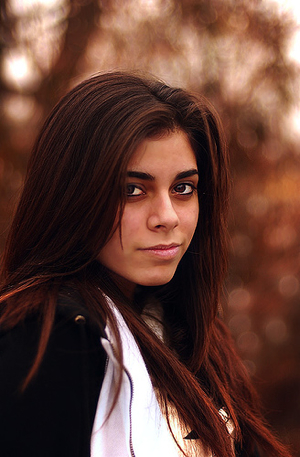 I’ve been taking a lot of portrait shots of our kids lately with my husband’s DSLR (Canon EOS 20D) and I’ve noticed that on some shots that I take the backgrounds is all soft and out of focus while in others it is completely clear. I’d like the soft background more but as I’ve been shooting in Auto mode I don’t know how the camera did it before. Can you give any suggestions? - submitted by DPS reader Sandra
 Thanks for the question Sandra. You’re right about the soft blurry backgrounds in portraits - in most cases they are a great way to highlight your main subject and get rid of any distractions in the background.
There are a number of things you might like to try. I’ll start with the easy ones:
Positioning of Subject
One of the easiest things you can do is position the subject you’re wanting to photograph as far away from any objects behind them as possible. If they are standing right in front of a wall you’ll probably end up with it in focus no matter what else you do - but if they’re standing 100 meters in front of that same wall it’s going to be a lot more blurry. Of course this will only get you so far - you’ll need to do some of what’s coming next as well.
Portrait Mode
The Canon EOS 20D has a little wheel on top of it (on the left) with lots of little icons on it. One of those icons is a little head. This icon is the symbol for portrait mode and if you’re not confident with changing apertures (we’ll discuss this below) it’s a good mode to switch to as it will do some of the work for you. Portrait mode chooses a large aperture (a small ‘f’ number) which will make the depth of field (the amount of your shot in focus) smaller.
Aperture Priority Mode
Aperture Priority Mode is a great way to control depth of field as it will ensure your images are well exposed.
If you’re feeling a little more adventurous switch the wheel to ‘A’ which is Aperture Priority Mode (go on, you can do it). I’ve written on this mode before but to recap - this mode lets you choose the Aperture (the size of the hole in your lens) and tells the camera to choose all the other settings. This semi-auto mode is a great way to control depth of field as it will ensure your images are well exposed. For shallow depth of field and nice blurry
backgrounds choose a large Aperture (the smaller the number
the larger the aperture). Try taking a few shots at different
apertures and see how it affects the background of your shots - this is the best way to learn how to get more creative control in your shots.
posted by swapna @ 6:29 AM


0 Comments:
Post a Comment
Subscribe to Post Comments [Atom]
<<